The Story of an Image

In preparing for my Science, ICT, and the Global Classroom presentation at the Science Teachers’ of Western Australia Conference this weekend, I’ve learnt some valuable lessons about global connections, crafting powerful presentations, and about connecting science to the real world.

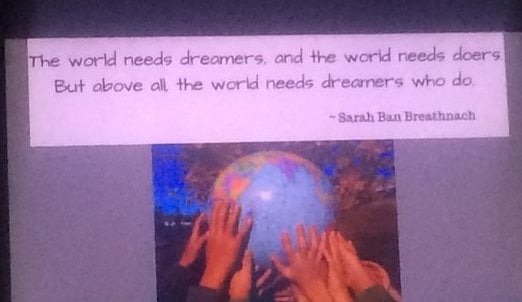
But perhaps the greatest lesson has arisen from my endeavours to model the appropriate (legal) use of images in educational presentations …

This is the story of an image, and there’s quite a story to tell ..

Image:  Jordi Rios. Reproduced with permission

I first came across this image through Twitter, where it appeared on the Facebook page of a prominent Science communicator in the USA. With the intention of using this quote and image in my presentation, I contacted the owner of the site – only to discover that he didn’t own the image!

With his kind assistance, I traced the imaged to the 500px site, where you can view the original version.

What followed was fascinating …

After leaving a comment on the site, I received an email from the artist in Spain, who was quite surprised to hear from me – for several reasons!

Firstly, he had no idea his image was being used in the above form, and secondly he wasn’t particularly happy that the image didn’t (and still doesn’t) attribute him as the artist!

With the help of Google Translate, and several emails later, Jordi kindly gave me permission to reproduce the image (and quote) for educational use.

But, this whole experience has left me with an important lesson about images on the Internet  Just because it’s there, doesn’t mean you have a right to take it and use it. I’ve also learnt that that asking for permission can have some unintended, unexpected consequences. But I’m glad I did.

Print Friendly

Building a Western Australian PLN (#WApln)

Halfway through last year, a Twitter conversation with @suewaters raised the prospect of building the Western Australian online teacher community, with the goal of running our own professional development through unconferences led by educators, for educators. (There is a BIG event in the works, more details coming here soon).

One of the key issues raised out of our early discussions was our difficulty in finding local Twitter teachers,and the need for a specific Western Australian education Twitter hashtag. At the time we only knew of around 10 people, but with the recent efforts of @LouCimetta in the Catholic Education school system, there are now more than a 100 Twitter teachers here in the West.

In what we believe is the first step of a long journey, we are launching the #WApln Twitter hashtag. This is intended to be a universal Western Australian education hashtag – we welcome contributors from primary, secondary, and adult education – across the government AND private sectors, and in metropolitan AND rural areas.

Get Involved

1) Tag your tweets with the #WApln hashtag, and add it to your Twitter client (Hootsuite, Twitterific, Tweetdeck).

2) Subscribe to @mgraffin’s WA Educator’s Twitter list - instantly follow 100+ local educators!

3) Please help spread the word – through your blogs, school communities, and Twitter networks!

Learn More

What the heck is a PLN?


Introduction to Twitter (via @KerryMuste)

Print Friendly

“The View Over the Hill” (#Slide2Learn Reflections)

Slide via @learnexchange

Last week, the #Slide2Learn Conference hit Western Australia for the first time. Normally, teacher-run ICT / mobile learning conferences such as these pass us by, but I’m really grateful that this one didn’t!

Sometimes you get a quote which just defines a conference, and this one from Ben Beaton (@learnexchange), sums it up nicely:

#slide2learn was an opportunity for early adopters,  ICT leaders, and keen life-long learners to help each-other stand on top of the hill, looking towards and planning for a future where concepts of ‘mobile learning’ and ’21st century skills” are obsolete, and just called “learning”.

Like many others at the conference, we believe that ICT and mobile devices are tools which can, and should be invisibly integrated into the teaching and learning process. We’re not interested in promoting the “next great revolutionary device” … we’re interested in promoting and supporting LEARNING through technology.

We came together with different skills, perspectives, and philosophies – but #slide2learn gave us the chance to connect, and make our voices heard – as we move towards the top of the hill … together.

Skype Keynote by @achurches

Through #slide2learn, I was able to:

  • Build & develop my professional networks through meetings and conversations with so many wonderful teachers, including many online collaborators I was meeting f2f for the very first time.
  • Meet the amazing @TonyVincent (thank you for being so welcoming)
  • Discover the language and resources to define my philosophy of teaching and learning … I learnt a great deal about “Challenge Based Learning” from the Apple rep. and @janeinjava.
  • Develop my skills and professional knowledge in relation to iPad VPP management, Augmented Reality, and use of iPads in Early Childhood.
  • Learn some valuable presentation skills from the Keynote presenters – most of whom I’d already met on Twitter :)
  • Launch the #WApln twitter hashtag (more info coming), and commence discussions with @JASONDARGENT and others about a TEDx ED Perth event in 2014.
  • Fit into a community of teachers who share my ideas, goals, and dreams for the seamless, and ultimately invisible integration of iOS devices into teaching and learning.
On a personal note, I am extremely grateful for @LouCimetta, who gave me the push I needed to come to #slide2learn. Lou, your support and advice is always greatly appreciated, and I hope to work more closely with you over the years to come.


Augmented Reality with @kmacc1 and @deanscanlon


Congratulations go to the AMAZING #slide2learn team, who pulled off an incredibly rich, diverse, and valuable learning experience.

You did such a great job that I will seriously consider flying over East for the next conference :)

via @KerryMuste


Congratulations also go to @KerryMuste and @AmieMeyer4, two amazing fellow West Australian teachers who presented at #slide2learn. 

@KerryMuste, #globalclassroom teacher presenting @ #slide2learn


And thanks to all those wonderful people that I was able to meet f2f for the first time … there are too many to list, but you know who you are.

Thank you for the conversations … I’ll see you online :)

Print Friendly

Finishing up the #WLPSict Journey – For Now

On Wednesday (March 27), I completed my four week stint as the #WLPSict integrator.

I left with mixed emotions … sadness at leaving a position which I loved, but also with a great sense of personal vindication. I left knowing that I’d done my best, and that I’d done it well.

The last week gave me the time to finish what I’d started, wrapping up some projects that I’d been preparing students’ for, as well as laying the seeds for ongoing ICT projects which will continue when I’m gone.

Here’s my final #WLPSict wrap for Week 4 …

World Water Day 2013 (Year 2, and some Year 7s)

I’ve already blogged about this here, so I won’t go into too much more detail – except to say that with comments from 10 countries, and 1000+ hits in a week, I’m proud to say that the third anniversary of my ‘first’ global project was a wonderful success. Well done kids! :)

Completing the Asia Google Docs Inquiry (Year 5/6)

I spent my last lesson with the Yr 5/6′s helping students finish their Asia presentations, incorporating the information so kindly shared by students and staff at a variety of international schools throughout Asia. Unfortunately, despite my best efforts, I was unable to obtain copies of the presentations to share online, as I couldn’t work out where the students had saved them! :(

If I’d had more time, I’d have used Google Presentations … which would have allowed students to actually collaborate on their presentations AND easily share them online! (I’ll get off my Google Soapbox now …)

I’d like to take this opportunity to thank the staff and students at the following schools for the wonderful support for this experimental project:

PuppetPals with Year 3N

I was really pleased with the progress Year 3N (Year 2F, and Year 3C) made with their use of the PuppetPalsHD iPad app.

We used our last lesson in Year 3N to create group PuppetPalsHD presentations on Jungle creatures, tying in with the class theme. With the help of their wonderful classroom teacher, students had planned these presentations, and the final results weren’t too bad. I was able to put a few on the school YouTube channel, and I’ve shared them below.

This little project bore witness to one of the most infuriating moments of my #WLPSict tenure … stay tuned for my upcoming reflections (rant) on (trying to) teach about Creative Commons images.

WordFoto with Year 3C

The Year 3C teacher has exciting plans for using the WordFoto app with her class, and to my great surprise (and pleasure) actually borrowed an iPad, and showed her class how to use it (outside of our ICT time) – a significant leap forward!

So I spent my last lesson with Year 3C roaming the school grounds with a box of iPads and iPods, letting students have a play with the app, and Dropboxing the results. The brief was to create WordFoto partner portraits & school landscapes, so the only one I’m really comfortable sharing is the one they did of me :)


Year 4 – Getting Excited about Animoto

In my last week, I introduced the Year 4 students to Animoto. While with hindsight I wouldn’t use a ‘whole-school’ account again, I was really pleased to see how popular (and useful) this tool actually is. The Animoto for Education account wasn’t as fully featured as I’d expected; however, it does allow for the creation of student accounts – In fact, I’ll be recommending WLPS teachers to create their own class accounts in future.

Here’s a student created example – using images they took on a recent class excursion to “Sculptures by the Sea”, at Cottlesloe Beach, WA.

And thus ends my stint at #WLPS … for now at least. This is one of remarkably few schools where I have truly felt ‘at home’, and the first where I’ve been able to really share my passion for all things ICT and global education. I hope that this #WLPSict journey marks the beginning of a fruitful long-term relationship over the years to come. Time will tell.

Print Friendly

Back for 2013: The World Water Day International LinoIt Project

On March 22, 2013, I’ll be celebrating the third anniversary of my first ever global project. Who would have thought that two years would change so much, and open up such a world of opportunity?

This year, the students of West Leederville Primary School (Perth, Western Australia) will be hosting the third “World Water Day International LinoIt Project”.

On March 22, we encourage teachers around the world to explore the issues of water conservation, access, cooperation, and sustainability with their students. It could be something simple – a discussion about why water is important to us, an art activity, a World Water Day logo design activity; or something a little more involved – such as researching the key issues of World Water Day 2013.

And we’d like to share your students’ work, thoughts, and learning with the world via our public LinoIt page. You can upload images, text, and videos, and contribute to a global discussion about our most precious resource: water.

This project is open to K-12, and we’d greatly appreciate international contributions!

Project URL: http://bit.ly/worldwaterday2013

Learning Resources

If you have any questions about this project, please contact Michael Graffin (@mgraffin / @gcporganisers), or email us at globalclassroomorganisers AT gmail.com.

[youtube https://www.youtube.com/watch?v=LO1X-bNW180?rel=0]

Print Friendly

#WLPSict – Weeks 2 & 3


cc licensed ( BY SA ) flickr photo shared by Saad Faruque

While the past two weeks have passed by in a blur, I can honestly say that I look forward to my #WLPSict teaching days. I’m starting to build meaningful relationships with the teachers I’m working with, and my students eagerly anticipate my arrival in their classes.

It’s been tough knowing that my initial four weeks are nearly over, yet I’m starting to see some of the rewards of my paced, collaborative approach.

When I walk into my classes, I’m starting to see classroom teachers taking the initiative … actively preparing their students for their ICT time. For example, our Year 3 teachers have encouraged their students to develop story plans for their PuppetPals animations; and have been excitedly brainstorming ways to integrate the app into their Jungle theme.

I’ve learnt a few technical & management lessons the hard way (particularly in the Year 4 class), and have struggled somewhat working with the Year 1 students … but I feel that I’m getting there, slowly.


Weeks 2 & 3 looked something like this …

Years 1-3

I’ve introduced an ICT rotations scheme to ease management issues, and ensure easier access to mobile devices. I now take a cart of laptops, and as many iPad 1 & 2s as I can get my hands on (they are in hot demand!). Half the class does Mathletics / Reading Eggs, while I work with the students using the iPads. This has had the side benefit of allowing teachers to ask questions about how to manage their students’ tasks, and monitor their performance.

The Year 1 students in particular will benefit from this long term, for as indicated by one of the teachers, a number of ESL students were unable to keep up with the whole-class activities.


cc licensed ( BY NC ND ) flickr photo shared by Ευτυχία (Jim is Nice)

Two of the Year 2 classes are researching old fashioned toys and games, with a view to creating iMovies and an assembly item. One of the Year 2 teachers is an early adopter of iPads and ICT, and she basically plans the lessons, with my input as needed.

The Year 3s, and the other Year 2 class are continuing to work on PuppetPals. This past week, I introduced these students to the Character and Background import options in the Puppet Pals Directors’ Pass.

I have also showed them how to import / export photos via Dropbox, as we are using iPad 1s (without cameras) and iPad 2s. I have been warned that the use of Dropbox can put pressure on the school’s internet upload/download limits, but I think these skills are too important to ignore. I’ll see how we go :)

Next week, the Year 3s will be creating Jungle poetry / information reports using PuppetPals; importing custom backgrounds and characters that they have created in Art. This will be the culmination of several weeks work, and I’m really looking forward to seeing the final results. It seems that taking things slowly has paid dividends … 

Year 4

The technical problems I was having with a whole class Google Doc continued in Week 2 … I won’t be doing that again anytime soon. It seems too many users accessing a document from the same network is a big no-no. I did actually fix the problem last week, but the class had moved on to other things. Fair enough.

In Week 3, we introduced students to WordFoto, and dropboxed their creations – with the intention of printing them off next week. I am hoping to introduce this class to Aurasma, an augmented reality app, next week … not sure yet! I don’t want to overload the teacher…

Years 4/5

Sadly, I’ve only had two opportunities to work with the Year 4/5 class  … due to the Swimming Carnival, and their upcoming class excursion next week. We spent our second session completing their “Sculptures by the Sea” presentations, and exploring options for a future animation project.

These students deserve a special #WLPSict mention for being on the receiving end of Mr Graffin’s rant on effective presentation design in Week 1 … fluorescent colours and overblown animations were NOT on my wish list! lol.

Years 5/6

Last week was the first time my Year 5/6 class had their full allocation of ICT time, after missing out on most of the past two sessions due to catch up science lessons with the Year 6/7 class. We are making progress!

My students have all entered their questions into our Asia Inquiry Google Doc, and we’ve received responses from students and teachers in Cambodia, Nepal, India, Japan and Thailand! The challenge to connect with Malaysia, Laos, Myanmar, and Vietnam is still ongoing! So if you happen to know someone in these countries, could you please send them a link? Thanks :)

The students are currently working on their project presentations, choosing to present their research using Pages, PowerPoint, or Comic Life.

While my students are very new to ‘learning with the world, not just about it’, I’m actually pretty happy with our attempt to connect with Asia. Yes, we’re barely scratching the surface, but its a positive start. And I’m working in a school environment which is open to these connections … and that’s more than I’d hoped for.

Year 6/7


cc licensed ( BY NC SA )  flickr photo shared by totallyradshow


While we missed last week’s session due to the Swimming Carnival, almost all our students are ready to film their green-screen movies. Did I mention that the green screen kit ARRIVED!!??? (Very excited!).

We’ve spent a total of two lessons on planning and experimentation, and students’ scripts and sound effects are practically ready to go. Unfortunately, it seems I’ve been dragged in as a character in one group’s movie … Not sure if I’ll be able to wiggle out of that one! We’ll be filming and editing over the coming week.

I am hoping to share students’ videos on the school blog / wiki, and invite warm and cool feedback from international viewers (via Google Docs). The idea is that students need to understand that they are creating work for an authentic, global audience – not just their teachers.

Notes - 

In Week 2, I had my first opportunity to meet the student ICT Angels, learning about their roles and responsibilities. They manage the charging of laptops & iPads (when they don’t forget!), and run the school blog. Having seen the blog, I’m looking forward to introducing the ICT Angels to some multimedia creation tools, such as Animoto, VoiceThread, PhotoPeach, etc. All in good time.

A key consideration, which I’ve noted for future reference, is the need to explicitly clarify when students are released for ICT Angel work, i.e. during silent reading time, and on Tuesday afternoons prior to Assembly. Also mentioned was the need for Angels to support teachers’ use of ICT, rather than doing the work for them.

The strict guidelines and rules for the ICT Angel program help to minimise the impact on students’ learning time; and the students’ know that they can be replaced if they don’t fulfill their responsibilities! The application process for these positions is EXTREMELY competitive at this school!

Other things on the agenda have included (finally) starting work on the #WLPSict Staff wiki, and starting to identify apps to remove from the school’s mobile devices. There are literally 120+ apps on the iPod Touches and iPads at the moment, and we need to sort out the mess before we start using Apple Configurator to manage our devices.

As far as I can tell, there’s one week to go. Here’s to a good one :)

Print Friendly

The Power of Connections & Conversation

It is hard to believe that #ACEC2012 has been and gone. Yet, I will carry its legacy for many years to come.

For me the conference was not about the presentations or the keynotes, although they had their place. It was about the connections, the conversations, … and the food … (only partly kidding!)

Photo by @anouk_ratna, Student Photographer @ #ACEC2012

During the conference, I had the opportunity to meet many wonderful, inspiring educators – some of whom I have known and worked with online for years. Some highlights included meeting @rgesthuizen, @ackygirl, @brettelockyer, @HenriettaMi, @losiath, @murcha, @tasteach, @alupton, @smadsenau, @melcashen, and frankly, the list goes on …


I took a great deal of confidence and affirmation away from #ACEC2012. 

Making my presentation debut at Australia’s national ICT conference was a personal milestone, one which I will remember for many years to come. The fact that I had a full house, and received such wonderful feedback on the ‘passion’ of my presentation, was a welcome recognition that my work is valued beyond the emotional roller-coaster of my day-to-day teaching practice.

I knew that my work in global education was respected by educators around the world, but I really appreciated the opportunity to sit down and talk to people whose teaching practice and educational outlook are being transformed through their engagement in the #globalclassroom community.

I’m a teacher. I may not have my own class, but I’m making an impact.

And I’m already looking forward to attending #ACEC2014 in Adelaide!


Skyping with @SAVSchool at #ACEC2012
Print Friendly

Presenting at #ACEC2012

Cross Posted at The Global Classroom Project

On Wednesday October 1, 2012, I had the wonderful opportunity to present with Nigel Mitchell (@1nbm) on the topic: “Working in the Global Classroom” at theAustralian Computers in Education Conference


Despite some initial technical hurdles, including the fact that Skype was blocked at the school, the presentation was a great success.

We managed to Skype with Julie Lindsay, the co-founder of Flat Classroom Projects; and shared our global collaboration stories with a large local audience, and a small group of teachers in Taiwan, India, and the United States via UStream,

I hope you will take some time to explore our slides, and watch our UStream recording.

You can access, and contribute to our presentation notes here.

Print Friendly

Helping Build “The Global One-Room School House”

Logging into Twitter this evening, I came across a fascinating, thought-provoking video entitled “The Global One Room School House“.

Containing excerpts from John Seely Brown’s Keynote at the 2012 Digital Media and Learning conference in San Francisco, it explores the notion of teaching and learning within “a global one-room schoolhouse” based on networks of imagination. (Reference)

The Big Idea

Some of the key themes of this video include the idea that “Entrepreneurial Learners are fundamentally makers and tinkerers”, and that as networked learners, “we need to invent new institutions, new social practices, and new skills to enable us to use technology to enhance and inspire learning.

I believe that teaching and learning is not all about the technology.

As stated in the video, Learning the technology is the easy part. It is about building, and participating within the wider, networked community. The video describes this concept as “entrepreneurial learning”, and I’ve blogged about it before, under my musings on becoming a 21st Century “Teacherpreneur”.

In the video, Brown argues that “we are no longer isolated learners or creators … we are part of a networked community”. This means we are not creating (or teaching) skills and knowledge which are stable and unchanging, but knowledge and skills which are destined to evolve over time and across different social and learning contexts.

He concludes by arguing for the “need to build a global one-room school house”. A community where learners can connect, teach, and learn from each-other; and “play” with new tools and concepts in a supportive, safe learning environment.

Building Educational Change 

It is hard to believe that through my work in building and leading The Global Classroom Project, I am helping to make John Brown’s inspiring vision an educational reality.

We are, in effect, building educational change – by creating a network of interconnected learners, and endeavouring to engage and inspire them to participate in, and help us grow a community of 21st Century teaching and learning practice.

We live in exciting times. Who knows where they will take us in the years to come?


Print Friendly

Engage, Connect, Inspire: My Teaching Philosophy


Whist preparing a recent job application, I took the opportunity to update my teaching philosophy statement, the ‘reflective ‘manifesto’ which defines my beliefs about 21st Century teaching and learning practices. I’ve posted it here.

What impressed me the most was not that my ideas and approach had necessarily changed over the past 3 years, but how I now have the practical experience and language to describe how I apply these ideas in my professional practice.

And then today, I found this video (via @HonorMoorman), and was lost for words … It seems I’m not the only one who believes in the power of technology to Engage, Connect, and Inspire …

I couldn’t explain why any better myself.

Print Friendly